Free Linux Troubleshooting Quick Start
An app is down.
Know what to
check next.
A running process doesn’t mean a working application. Learn how to check the process, follow the logs, and test the request that actually failed.
- Know which command answers which question.
- Tell a healthy process from a successful request.
- Turn your findings into a useful incident note.
2-page PDF. Free download. No AWS account needed.
New to the terminal? Start with the basics.
One example from the lesson
The health check passes.
The order still fails.
This is where memorizing commands stops helping. You need to know what each result proves—and what to investigate next.
The guide gives you a sequence. The companion exercise lets you try it on a local service, then write down what you found.
Read the worked lessonFrom the practice lab
- Health route
200 OKThe process responds.- Orders route
503 Service UnavailableThe operation fails.- Matching log
inventory timeoutA lead for your next check.
Your next move: investigate the dependency behind the failed request. A green health check hasn’t explained this failure.
Be able to explain the result.
That’s the aim of these lessons. A command is useful when you know why you ran it, what its output tells you, and what you would check next.
In the troubleshooting exercise, you’ll finish with a short incident note: the symptom, the scope, your evidence, your next test, and the limit of what you know. It’s a small piece of work you can explain to another person.
Start with the guide. Then try the exercise for yourself. Join the free Skool community to share an attempt or a specific question.
There’s a next lesson when you’re ready
A practical route
through Linux and AWS.
Eight free written lessons, with examples and references. Later lessons add guided exercises, workbooks and AWS tabletop alternatives.
See all eight lessonsAzure, GCP, security, ethical hacking, DevOps/CI/CD, software foundations and tech-sales modules are planned. See the Academy and Circle support options for the current membership scope.
Cloud foundations
Understand the service models and who is responsible for what.
Linux, from the terminal to troubleshooting
Navigate, inspect a failure, write a script, and test a restore.
AWS, from your first instance to private S3
Work through access, networking, permissions, and cleanup.
Before you download
What’s in the free guide?
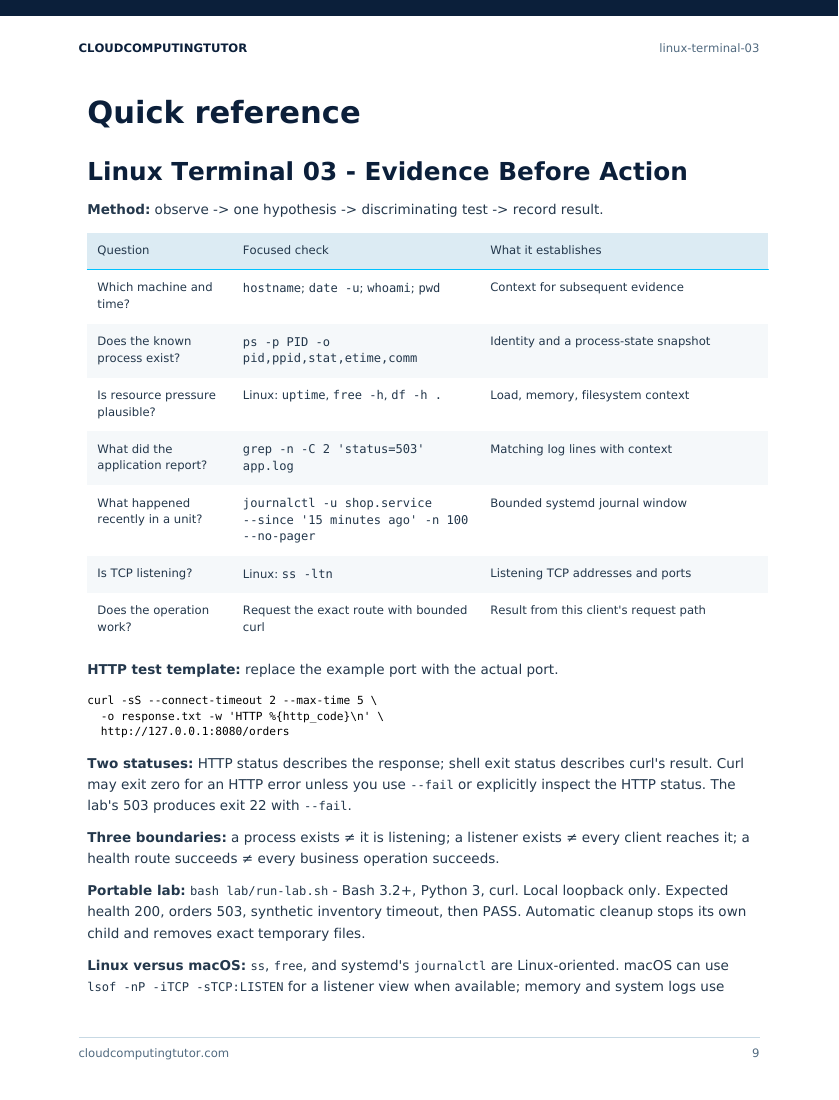
A two-page Linux troubleshooting reference. It connects questions to commands, explains what each check establishes, and gives you an HTTP test pattern and a structure for recording your findings. The linked written lesson supplies the full explanations and practice files.
Is this a good place to start if I’m a beginner?
You’ll get the most from the troubleshooting exercise if you can already navigate folders and run commands. If that is new to you, begin with Linux Terminal 01. That lesson is free too.
Do I need AWS or a paid subscription?
No. The PDF and companion written lesson are free. The troubleshooting lab runs locally; it does not create cloud resources or require an AWS account.
What do I need to run the exercise?
The local lab uses Bash 3.2 or newer, Python 3, and curl on Linux or macOS. The lesson distinguishes Linux-specific commands from macOS alternatives. You can also read the worked example before setting up the lab.
How do I receive it?
The download button opens a PDF download directly. Save it wherever you keep your study notes, then use the companion lesson to work through the example.
Have a better next step
than “try restarting it.”
Get the reference. Follow the evidence. Write down what you found.
Free, two-page PDF · Companion lesson included